

👋 Hey, Linas here! Every day, I break down 3 stories shaping the future of FinTech & Artificial Intelligence - plus the money movements and trends worth tracking. First time here? 399k+ FinTech and AI leaders get this daily. Join them:
Qwen3.8-27B is the “DeepSeek Moment” for open source AI. A 27-billion-parameter file you can easily download tonight now does the kind of coding and agent work that needed a closed, hosted frontier AI model just a year ago. Let that sink in! 😳
Some AI developers even called this open weights release the most civilization-changing 20 GB of data ever published. While clearly exaggerated, the story of Qwen3.8-27B now definitely matters more than any single benchmark number attached to it.
Qwen 3.8 27b running locally vs. Opus 4.8. Source: Alex Finn via X
Alibaba’s Qwen team shipped Qwen3.8-27B on August 14, 2026: a dense, Apache 2.0-licensed, vision-capable model with native image and video understanding and a 262,144-token context window. Unlike the mixture-of-experts giants dominating recent frontier releases, every one of its 27 billion parameters activates on every token.
The full weights compress to a 17-18 GB file at 4-bit quantization, small enough to load, alongside its KV cache, on a single 24 GB consumer GPU such as an RTX 3090 or 4090, or a mid-range Apple Silicon Mac. Parameter count, file size on disk, and the RAM or VRAM you need to run it are three different numbers, and this guide keeps them that way throughout.
Qwen 3.8 27B Q4 running on an RTX 4060 with just 8GB VRAM and a 64,000-token context window using Unsloth's new IQ4_XS quant at 14.6GB on disk.
This AI release is unlike anything we’ve seen before, and the data proves it. Independent third-party benchmarking from Artificial Analysis puts Qwen3.8-27B at 52 on its Intelligence Index, a composite across reasoning, knowledge, math, and coding. That score ties GPT-5.6 Luna (max) and sits one point behind GLM-5.2 (max) and DeepSeek V4 Pro (max), despite both being vastly larger mixture-of-experts systems.
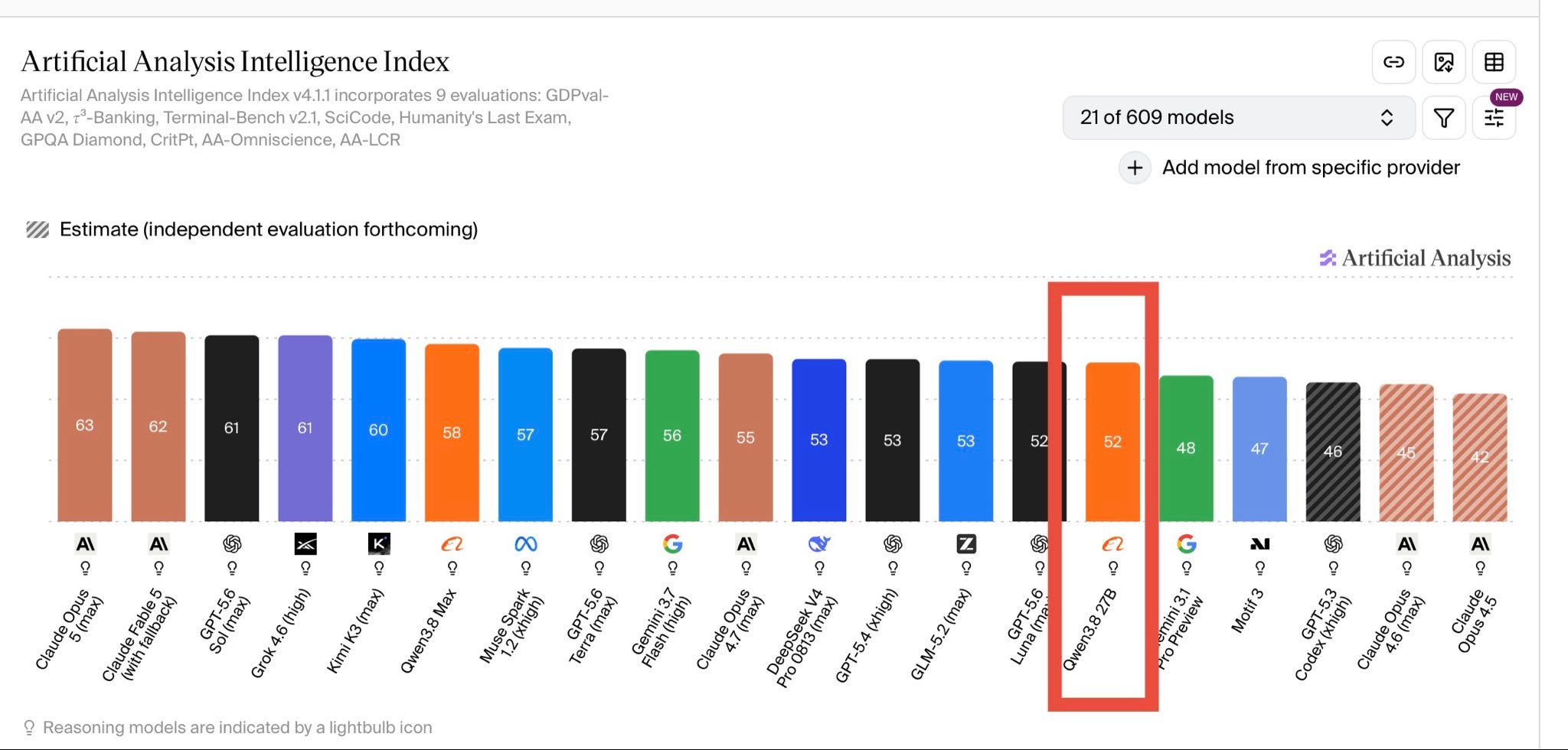
On Qwen’s own reported agentic-coding benchmarks, it also jumps sharply over its dense predecessor, Qwen3.6-27B: from 63.4 to 73.0 on Terminal-Bench 2.1, for instance. Of course, we should treat the vendor-reported numbers as directional and the Artificial Analysis figure as the more independent read here, but both point in the same direction.
It’s important to note that none of that translates automatically into a good result on your machine. Local performance depends on which quantization you pick, how much memory and context headroom you actually give it, which runtime you use, and how hard you make it think.
By far the biggest reason “download and run” fails the majority of people trying to run this locally is the model’s own defaults. Qwen3.8-27B thinks by default, and its default reasoning setting is the most expensive one available. Left alone, it will burn tens of thousands of reasoning tokens on requests a human would answer in one sentence. In long agent sessions, that same verbosity can quietly exhaust the context window and return empty output that looks like an unrelated error. Therefore, getting frontier-adjacent results out of a 27B model you own outright means fixing that mismatch deliberately, not hoping the defaults are fine.
The same pattern actually runs through the whole open-weight AI surge of the past year: Kimi K3 pushes the frontier at enormous scale, while Qwen3.8-27B makes the more personally useful point that frontier-adjacent capability can now fit on hardware a single builder already owns. Our earlier deep dive covered that same local-AI shift through GLM-5.2 (GLM-5.2: The ChatGPT Moment for Local AI).
That’s why, in this guide, we go deep on the part that actually determines your results: how you run the model, not just whether you can. Here’s what you’ll unlock:
The exact
reasoning_effortand context-window settings that stop the model from overthinking and burning your token budget on trivial tasks.A hardware-and-quantization decision table matched to real VRAM tiers, 8 GB laptops through 48 GB workstations, including which quant is currently the best default at each size.
The launch flags (MTP speculative decoding, KV cache precision, chat template handling) that separate a sluggish setup from one running 2-3x faster on identical hardware.
A copy-paste prompt library built around the model’s documented failure modes, so you inherit the fixes instead of rediscovering them the hard way.
Full local deployment walkthroughs for llama.cpp, Ollama, LM Studio, vLLM, and SGLang, plus the security and privacy calls worth making before you put this in front of real users or real data.
A misconfigured setup pays full compute cost for a model quietly working against you. A well-configured one runs something close to a frontier coding and agent system, on hardware you already own, for the cost of electricity.
Let’s make sure you run the latter.