
The Ultimate Guide to Claude Skills 🧠
You're typing the same instructions every morning. After reading this, you'll never do it again 🤖

👋 Hey, Linas here! Welcome to another special issue of my daily newsletter. Each day, I focus on 3 stories that are making a difference in the financial technology space. Coupled with things worth watching & the most important money movements, it’s the only newsletter you need for all things when Finance meets Tech. If you’re reading this for the first time, it’s a brilliant opportunity to join a community of 370k+ FinTech & AI leaders:
Somewhere in the last twelve months, a quiet split opened up among Claude's power users. On one side: people who open Claude every morning and type the same setup instructions they typed yesterday.
→ Brand voice rules. Formatting preferences. Step-by-step workflows they’ve memorized. They get good output. They’re productive. They think they’re ahead.
On the other side: people who typed those instructions once, saved them as a permanent Skill file, and never typed them again.
→ Their Claude sessions start pre-configured. The AI already knows their brand voice, their formatting rules, their workflow. First try, minimal editing, output that matches what used to take three rounds of revision. They are actually ahead.
The gap between these two groups compounds daily. And with Anthropic’s quiet release of Skills 2.0, complete with evaluation frameworks, A/B testing, and automated description optimization, that gap is about to widen into a chasm.
This is the most complete, practical guide to Claude Skills that exists. By the end of it, you’ll have built your first Skill, understand exactly how to test and optimize it, and know the architecture patterns that separate people who dabble from people who run entire workflows on autopilot.
First, understand what Skills actually are (and what they’re not)
The entire AI productivity conversation is stuck on the wrong question. Everyone asks: how do I write better prompts? The real question is: why are you still writing prompts at all? 🤔
A Claude Skill is a permanent instruction file, a markdown document stored locally on your machine, that tells Claude exactly how to execute a specific task. Not a system prompt you paste in. Not a project context file you upload. A standalone, reusable, testable piece of configuration that fires automatically when Claude detects a matching request.
The distinction from other Claude features matters, so let’s clear it up once.
→ Projects are your knowledge base. Upload a brand guide PDF, and you’re telling Claude “here’s what you need to know.” Static reference material. A library.
→ Skills are your instruction manual. You’re telling Claude “here’s exactly how to perform this task, step by step.” Procedural. Automated. A trained employee.
→ MCP (Model Context Protocol) is your connection layer. It plugs Claude into live data sources like your calendar, database, or inbox. Skills then tell Claude what to do with that data.
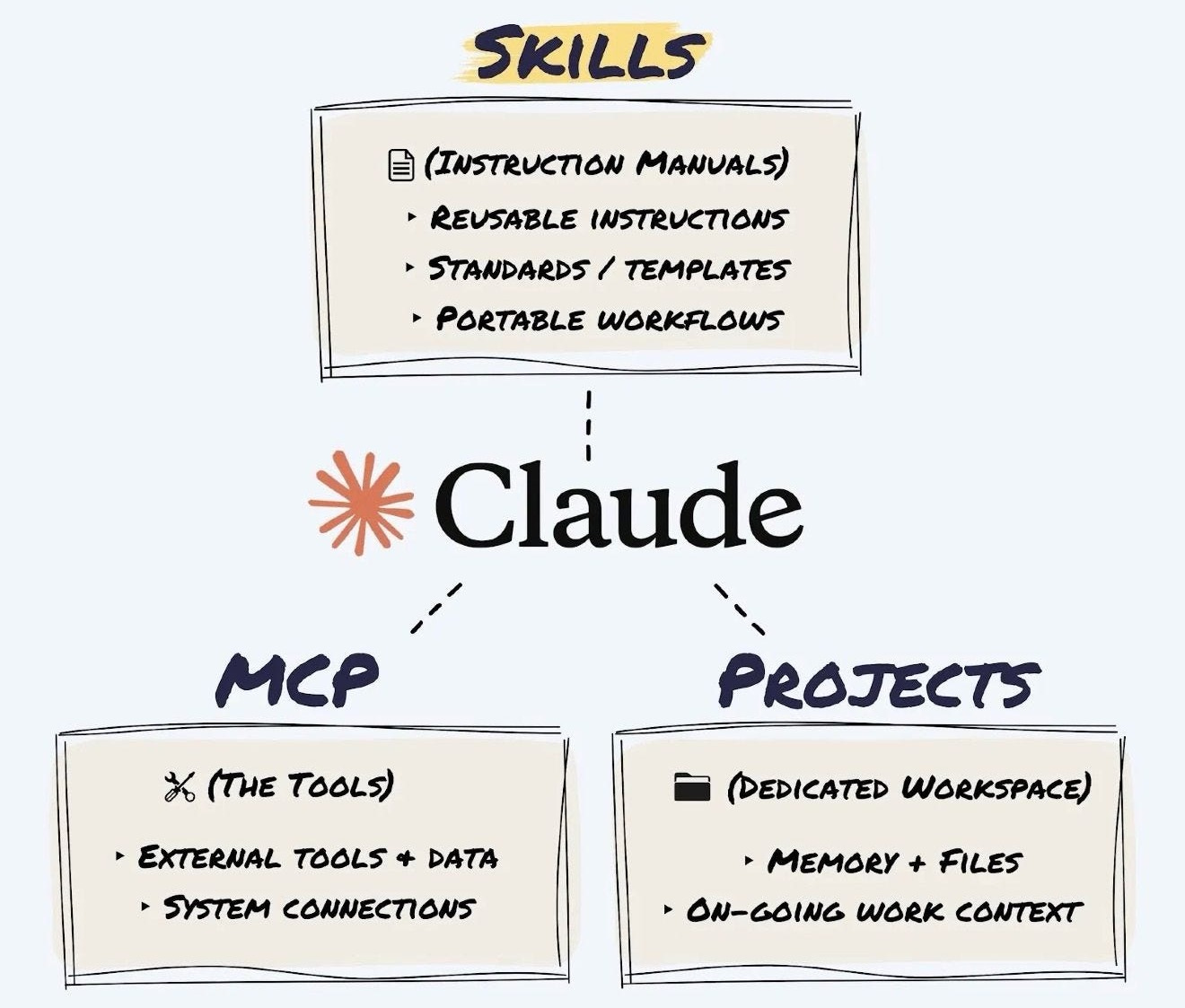
Here’s the simple test: if you’ve typed the same instructions at the start of more than three conversations, that’s a Skill begging to be built.
The anatomy of a Skill (simpler than you think)
Strip away all the jargon, and a Skill is nothing more than a folder on your computer containing a text file called SKILL.md. That’s the whole thing.
The folder follows three rules.
It uses kebab-case naming: lowercase, words separated by hyphens. So invoice-organiser, email-formatter, csv-cleaner. No spaces, no underscores, no capitals.
Inside, the file must be named exactly SKILL.md (case-sensitive, not skill.md, not README.md).
And an optional references/ subfolder holds any supporting documents too large to paste into the main file.
Your folder structure thus looks like this:
your-skill-name/
├── SKILL.md          (YAML header + instructions)
└── references/       (optional)
    └── your-ref.md
Drop the folder into ~/.claude/skills/ on your machine. Claude finds it automatically.
Skills work in both Claude Code (the command-line developer tool, where they have access to your file system and can execute code) and Claude Desktop/Cowork (the agent interface for non-developers, where they work through the desktop environment).
Same SKILL.md format, different execution context.
Building your first Skill, step by step

This is where most guides either overcomplicate things or stay too abstract. Here’s the concrete process, broken into five steps that build on each other.
Step 1: Define the job with painful specificity
Before you write a single line, answer three questions.
What does this Skill do? When should it fire? What does “good” look like?
The answers need to be ruthlessly specific.
❌ “Help with data” is useless.
✅ “Transform messy CSV files into clean spreadsheets with proper headers, enforce YYYY-MM-DD date formatting, and strip empty rows” is a Skill that works.
The difference between a good Skill and a bad one is almost always decided at this stage. Vague definitions create vague outputs, every single time.
For “when should it fire,” think about what you’d actually type into Claude. “Clean up this CSV.” “Fix these headers.” “Format this data.” Those are your triggers.
For “what does good look like,” you need a concrete before-and-after example. Not a description of what the output should be. An actual sample showing the input you’d give and the finished product you’d expect back.
If you want Claude to help you nail this definition, use this prompt:
You are a Skill Definition Specialist. Your job is to interview
me until we have a razor-sharp definition of the Claude Skill
I want to build. You will not let me get away with vague answers.

Run this interview process:

PHASE 1 - THE TASK
Ask me: "What task do you want to automate?"
After I answer, pressure-test my response:
- If my answer is vague (e.g., "help with emails"), push back
  and ask me to describe EXACTLY what the Skill should do,
  with a specific input and specific output.
- Keep asking "Can you be more specific?" until the task
  description is concrete and actionable.
- Confirm the final task definition back to me in one sentence.

PHASE 2 - THE TRIGGERS
Ask me: "What would you actually type into Claude to activate
this Skill? Give me 5 different ways you might phrase the request."
After I answer:
- Suggest 3-5 additional trigger phrases I probably missed.
- Ask me about negative boundaries: "What similar-sounding
  requests should NOT trigger this Skill?"

PHASE 3 - THE QUALITY STANDARD
Ask me: "Show me or describe exactly what a PERFECT output
looks like for this task."
After I answer:
- Ask me to describe what a FAILED output looks like
  (so we know what to avoid).
- Ask me about edge cases: "What's the weirdest or most
  broken input this Skill might receive? How should it handle it?"

PHASE 4 - THE SUMMARY
Compile everything into a structured Skill Definition Brief
with these sections:
- Skill Name (in kebab-case)
- One-Sentence Purpose
- Trigger Phrases (positive)
- Negative Boundaries (when NOT to fire)
- Input Description
- Output Description
- Quality Standard (what "good" looks like)
- Edge Cases to Handle

Present this brief and ask me to confirm or revise before
we proceed.

Start Phase 1 now.
Step 2: Write the YAML triggers
At the top of your SKILL.md file, you write a block of metadata between --- lines called YAML frontmatter. This tells Claude when to activate your Skill.
Here’s what it looks like in practice:
---
name: csv-cleaner
description: Transforms messy CSV files into clean spreadsheets
  with proper headers. Use this skill whenever the user says
  'clean up this CSV', 'fix the headers', 'format this data',
  or 'organise this spreadsheet'. Do NOT use for PDFs, Word
  documents, or image files.
---
The description field is the single most consequential line in your entire Skill.
If it’s weak, your Skill never fires. If it’s too broad, it hijacks unrelated conversations. Three rules make or break it.
(1) Write in third person. ✅ “Processes files...” not ❌ “I can help you...”
(2) List exact trigger phrases. Claude is conservative about activation, so you need to spell out what the user might say. Be aggressive. Five to seven phrases minimum.
(3) Set negative boundaries. Tell Claude when NOT to fire. “Do NOT use for PDFs, Word documents, or image files” prevents your CSV Skill from grabbing every file-related request.
This prompt generates the YAML header from your definition:
You are a YAML Frontmatter Specialist for Claude Skills.
Your job is to write the most effective possible YAML trigger
block for the top of a SKILL.md file.

Here is my Skill definition:
[PASTE YOUR SKILL DEFINITION BRIEF HERE]

Generate the YAML frontmatter following these strict rules:

1. The "name" field must be in kebab-case (lowercase,
   hyphens only, no spaces or underscores).

2. The "description" field must be "pushy" — meaning it
   should aggressively list trigger scenarios because Claude
   is conservative about skill activation. Include:
   - A clear one-sentence summary of what the skill does
     (written in third person: "Processes..." not "I can...")
   - At least 5-7 explicit trigger phrases the user might say
   - Negative boundaries: "Do NOT use this skill for [X],
     [Y], or [Z]."
   - Context clues: "Also activate when the user uploads
     [file type] and asks for [action]."

3. Keep the entire description under 300 words but make
   every word count.

Output ONLY the YAML block (between --- markers), ready to
paste directly into a SKILL.md file.

Then provide a Trigger Confidence Report that rates:
- Activation likelihood on relevant requests: X/10
- False positive risk (firing when it shouldn't): X/10
- Coverage of common phrasings: X/10

If any score is below 7/10, suggest specific improvements.
Step 3: Write the instructions
Below the closing --- marks, you write your workflow in plain English. Structured with headings, sequential, under 500 lines.
Two components make this work. The steps, which break your workflow into a logical sequence of commands. And the examples, which show Claude exactly what input-to-output should look like. A single concrete example showing actual input and expected output is worth more than 50 lines of abstract description.
Your instructions should use imperative voice (”Read the file” not “The file should be read”) and leave zero room for interpretation. Every instruction should be specific enough that there’s only one way to read it.
Here’s a real example of what good instructions look like for a CSV cleaning Skill:
## Workflow

1. Read the provided file to understand its structure.
2. Identify the row containing the true column headers.
3. Remove any empty rows or rows containing only commas.
4. Enforce proper data types (dates must be YYYY-MM-DD).
5. Output the cleaned file with a summary of changes made.

## Output Format

Return a cleaned CSV file and a brief summary listing:
- Number of rows removed
- Number of date formats corrected
- Any columns with mixed data types that need manual review

## Edge Cases

- If the file has no clear header row, use the first
  non-empty row and flag it for the user to confirm.
- If a date column contains values that can't be parsed,
  keep the original value and mark it with [REVIEW] prefix.
- If the file is not a CSV (wrong extension or format),
  tell the user and suggest the correct tool.

## Examples

Input: A CSV where row 1 is a title, row 2 is blank,
row 3 has headers, and dates are in MM/DD/YY format.

Output: A clean CSV starting with headers in row 1,
no blank rows, all dates converted to YYYY-MM-DD,
with a summary: "Removed 2 rows, converted 47 dates."
You can use this prompt to generate the full instruction body from your definition and YAML:
You are a Claude Skill instruction writer. Generate the
complete instruction body for a SKILL.md file that is clear,
sequential, and under 500 lines.

Here is my Skill definition:
[PASTE YOUR SKILL DEFINITION BRIEF FROM STEP 1]

Here is the YAML frontmatter already written:
[PASTE YOUR YAML BLOCK FROM STEP 2]

Generate the full instruction body following these rules:

1. Start with a one-paragraph Overview for Claude.
2. Break the workflow into numbered steps under a
   ## Workflow heading. Each step: one clear action,
   imperative voice, only one possible interpretation.
3. Include a ## Output Format section specifying exactly
   how the output should be structured.
4. Include a ## Edge Cases section covering missing input,
   ambiguous requests, and unexpected formats.
5. Include at least 2 concrete examples: one happy path,
   one edge case. Show ACTUAL input and ACTUAL output.
6. Total length: 100-300 lines. Cut anything that doesn't
   directly instruct Claude.
7. No vague language like "handle appropriately" or
   "format nicely." Every instruction must be testable.
Step 4: Handle references (the one-level-deep rule)
If your Skill needs to reference a brand guide, template, or style sheet that’s too long to paste into SKILL.md, save it as a separate file inside the references/ folder. Then link to it directly from your instructions: “Before beginning the task, read the brand voice guide at references/brand-voice-guide.md.”
One constraint is non-negotiable: never have reference files linking to other reference files. Claude will truncate its reading and miss information. One level deep. That’s it. If you have a reference that depends on another reference, merge them into a single file.
For large reference documents, compress before including. Extract only the sections directly relevant to the Skill’s task. A 50-page brand guide probably has 5 pages of rules your Skill actually needs. Pull those out, create a quick-reference version, and save the full document for cases where the quick reference isn’t enough.
Step 5: Deploy
Assemble your folder. Drop it into ~/.claude/skills/ on your machine. Done.
Next time you make a request that matches your Skill’s triggers, it fires automatically.
No activation step, no special syntax, no “use my Skill for this.” Claude reads all available Skill descriptions, scores them against your request, and the highest-scoring Skill takes over.
The shortcut: let Claude build Skills for you
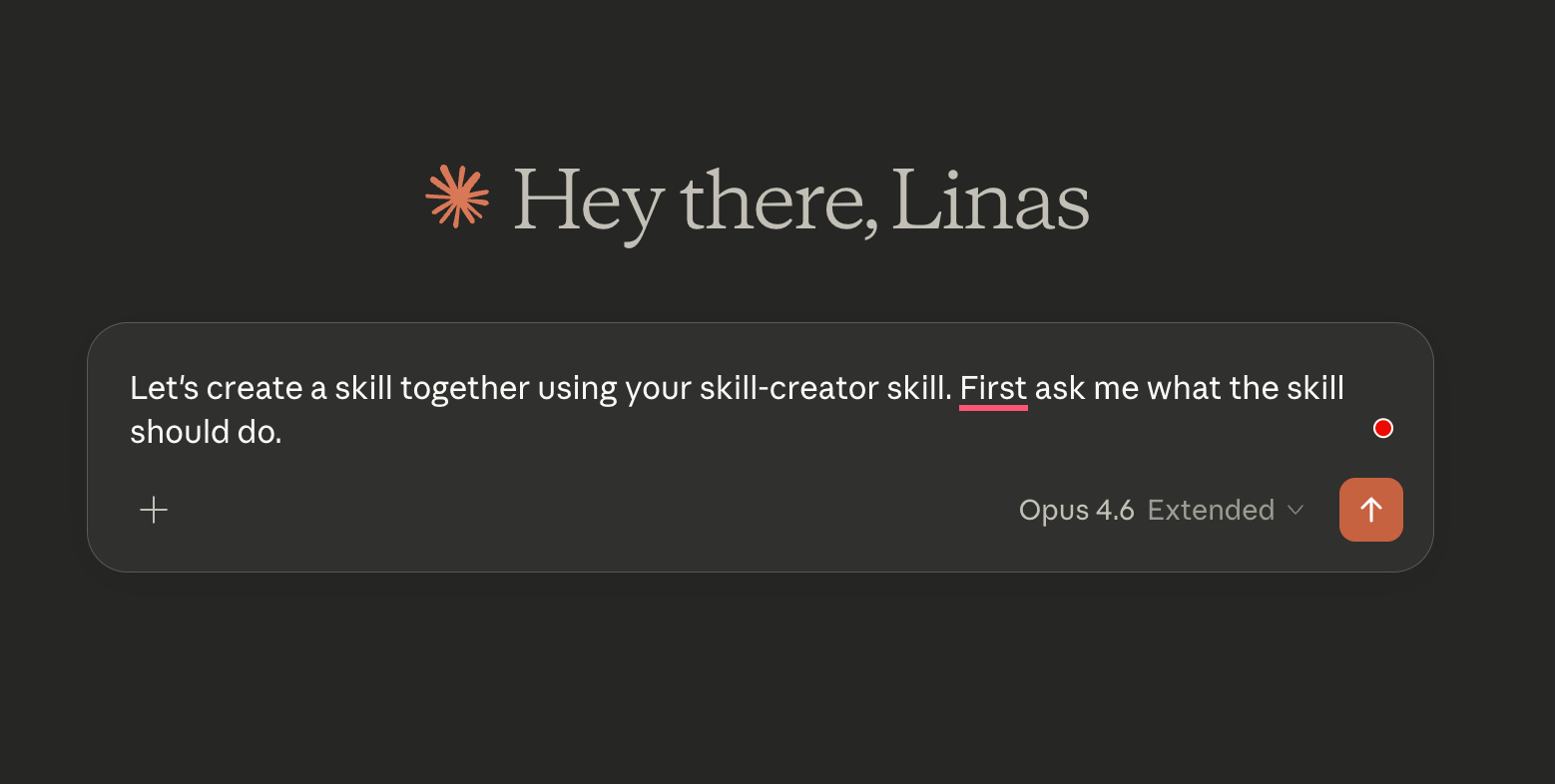
If the step-by-step process above feels like more effort than you want for your first Skill, there’s a faster path.
Anthropic built a meta-skill called skill-creator that constructs Skills for you through conversation.
→ Open a new chat.
→ Type “Use the skill-creator to help me build a skill for [your task].”
→ Upload your assets: templates, examples of past work, brand guidelines, anything that shows Claude what “good” looks like.
→ The skill-creator asks clarifying questions about your process, edge cases, and quality standards, then generates the complete SKILL.md, the folder structure, everything packaged and ready.
→ Save the folder.
→ Deploy.
Your Skill fires automatically from the next session onward.
Testing and iteration: the part everyone skips (and shouldn’t)
Here’s the thing most people get wrong. They build a Skill, try it twice, it looks “fine,” and they move on. Then it fails on the third edge case they didn’t anticipate.
That’s roughly equivalent to shipping code without tests because it compiled.
Skills 2.0 introduced three capabilities that change this entirely.
Evaluations: prove your Skill works
Tell Claude “use the Skill Creator to evaluate [your skill name].” It reads your Skill, generates test prompts based on what it’s supposed to do, runs each prompt with your Skill loaded, and checks whether outputs actually follow your instructions: tone, formatting, structure, all of it.
Instead of “I think my Skill works,” you get “my Skill passes 7 out of 9 tests, and here’s exactly where it falls short.”
Fix the failures, rerun, iterate.
The loop looks like this: run the eval, read the failures, tell Claude to update the Skill to fix the specific problem, rerun the eval, repeat until you’re passing clean.
A/B benchmarking: catch Skills that are hurting you
This one catches a problem most users never think about.
Say you built a landing page Skill three months ago when Claude needed detailed step-by-step instructions to produce decent copy. Then Anthropic ships a smarter model that’s already good at landing pages by default. Your old Skill is now telling Claude to follow the rigid steps written for a less capable version of itself. The Skill is actively making output worse, and you’d never know unless you tested.
Tell Claude “use the Skill Creator to benchmark [your skill name].” It runs the same tests twice: once with your Skill loaded and once without (raw Claude). A separate agent reviews both outputs blind. You get a comparison showing which version actually produced better results.
If raw Claude is winning, retire the Skill. Your outputs will get better by removing it. If the Skill is winning by a lot, keep it. If it’s winning by only a small margin, the model is catching up, and you should retest after the next update.
Anthropic ran this on their own internal Skills and found improvement opportunities on 5 out of 6. Even the people who built Claude had this problem with their own Skills.
Description optimization: fix the #1 reason Skills fail
The most common frustration with Skills is that Claude doesn’t use them when it should. The problem is almost always in the YAML description.
Tell Claude “use the Skill Creator to optimize the description for [your skill name].” It tests your current description against a range of prompts, checks whether the Skill correctly activates on relevant requests and stays quiet on irrelevant ones, then rewrites the description to improve triggering accuracy.
If you do nothing else from this guide, run this on every Skill you’ve already built. It’s the single fastest way to make all of them more reliable.
Architecture: what to do when you have more than five Skills
Single Skills are useful. A library of Skills that work together without conflicts is where the real leverage lives. And conflicts start showing up around the fifth Skill.
You ask Claude to draft an email, and the Content Repurposer fires instead of the Email Drafter. You paste a code snippet for formatting, and the Code Review Assistant takes over.
Two Skills with overlapping trigger phrases compete, and the wrong one wins.
The three rules for multi-Skill harmony
Every Skill needs a clearly defined territory that doesn’t bleed into another Skill’s domain. The Brand Voice Enforcer handles voice compliance. The Email Drafter handles email composition. The Content Repurposer handles format transformation.
No overlap.
Every Skill’s YAML description must explicitly list other Skills’ territories as exclusions. Your Email Drafter should say “Do NOT use for brand voice checks or content repurposing.” Your Brand Voice Enforcer should say “Do NOT use for drafting emails from scratch.”
Each Skill’s trigger phrases need to be distinctive. “Check the voice” should only match the Brand Voice Enforcer. “Draft an email” should only match the Email Drafter. If the same trigger phrase could match two Skills, one of them has a scope problem.
Adding scripts for computation
Some tasks need code, not just language. Calculating averages, parsing XML, and resizing images. A Skill can include a scripts/ directory with Python files that handle computation while the SKILL.md instructions handle judgment.
Your folder structure grows to:
data-analyser/
├── SKILL.md
├── references/
│   └── analysis-template.md
└── scripts/
    ├── parse-csv.py
    └── calculate-stats.py
In your SKILL.md, you reference the scripts with exact command syntax: “Run scripts/parse-csv.py [input_file] [output_file] to clean the data.” The scripts handle precision. The instructions handle interpretation. They work together.
Keep scripts focused (one script, one job), make them accept command-line arguments rather than hardcoding paths, and include error handling that produces clear messages Claude can read and relay to the user.
Conditional reference loading
A Skill that needs access to a 50-page brand guide, a 30-page style manual, and a template library will burn through its context window loading everything for every request.
The solution is splitting large documents into focused sub-files and writing conditional loading instructions in your SKILL.md: if the user asks about tone, load the voice quick-reference; if they ask about visual formatting, load the style quick-reference; only load the full document when the quick reference isn’t enough.
The five failure modes (and how to fix each one)
Every Skill failure falls into one of five categories. Learn to spot the category, and the fix becomes obvious.
The Silent Skill never fires. The YAML description doesn’t match user requests strongly enough. Fix: make the description more aggressive, add more trigger phrases, add context clues.
The Hijacker fires on wrong requests. The description is too broad or missing negative boundaries. Fix: add explicit exclusions, tighten trigger phrases to be more specific to the Skill’s actual function.
The Drifter fires correctly but produces wrong output. The instructions are ambiguous. Fix: find every sentence that could mean two different things and replace it with an instruction that can only mean one thing. ❌ “Format nicely” becomes ✅ “Use H2 headings for each section, bold the first sentence, keep paragraphs to 3 lines max.”
The Fragile Skill works on clean inputs but collapses on edge cases. Fix: feed it the worst-case version of every input (missing fields, wrong types, corrupted data) and add explicit handling for each failure scenario.
The Overachiever produces what you asked for plus unsolicited extras. The instructions say what to do but not what not to do. Fix: add scope constraints. “Do NOT add explanatory text, commentary, or suggestions unless the user asks for them. Output ONLY the specified format.”
Of these five, the Drifter does the most damage because it’s the hardest to notice. The Skill fires, the output looks reasonable, you move on.
But it’s subtly wrong in ways that compound over time.
State management: making Skills work across sessions
When you’re running a Skill across multiple sessions (writing a book, building an app, managing a multi-week project), Claude’s context window eventually fills up. It forgets what happened yesterday.
The fix is a “shift handover” pattern. Add one instruction to your SKILL.md:
At the start of every session, read context-log.md to see what we completed last time. At the end of every session, write a summary of what you finished and what's still pending.Claude reads its own notes from the previous session and picks up exactly where it left off. Same logic as a hospital shift change: the incoming doctor reads the chart, knows the patient’s status, and continues treatment without re-diagnosis.
What to build first

If you’re still reading and haven’t built a Skill yet, here’s your assignment.
Pick the one task you repeat most often with Claude. The prompt you’ve typed so many times you could do it in your sleep. Follow the five steps above, or use the skill-creator shortcut. Deploy it. Time how much faster your next session runs.
Then build another one.
The people building Skills today are assembling a library of tested, optimized AI configurations that compound in value with every session. Everyone else is starting from scratch every morning.
Ten minutes to build your first Skill.
That’s the only investment. Everything after that is returns 📈
This guide covers how to build, test, and optimize individual Skills.
But the real power emerges when Skills become part of a larger system: an AI operating layer that runs your daily workflow, manages your team’s processes, and handles operational complexity across your entire business.
If you want to see how that works in practice, two of my other guides go deeper. The first walks through how I built an AI OS to run a startup with Claude, end-to-end. The second shows how to turn Claude Cowork into your personal COO, handling the operational work that eats founders alive.
Both are available below and pick up exactly where this guide leaves off.


And that’s not even it. In case you missed it, check out these resources as well:


And that’s a wrap.
In 2023, I started sharing resources to help you become a more successful entrepreneur, investor, or business leader. I hope you will find these new resources valuable too.
Keep dreaming & keep building.
If you found this useful, share it with others and spread the word:
The context-log pattern for state persistence across sessions is the piece most guides skip. Skills that don't write state somewhere reliable stop being useful the moment the session ends. One gap I've hit with skills on persistent/headless setups: YAML trigger matching gets inconsistent when the agent is running in -print mode or piped through cron.
The auto-invocation logic that works fine interactively doesn't always fire on scheduled tasks. Worth testing any skill with triggers against your actual execution context rather than just the interactive session.
How are you handling skills that need web access: MCP fetch tools baked into the skill definition, or separate?
One banger after another. Priceless - thank you!